 Watch YouTube together
How to Watch YouTube Together Online (Every Way That Works in 2026)
Every way to watch YouTube together online in 2026: synced rooms, Discord Watch Together, SharePlay on FaceTime, what works on phones, and what to do when a video won't play.
 By Mario Jankovic 10 min read
 The easiest way to watch YouTube together online is a synced player. One of you opens a room on a site like Watch2Gether or Glint, pastes the video link and sends the room link to everyone else. Play, pause and skipping then happen for everyone at once, and you talk over voice or chat. YouTube has no watch party button of its own on computers. SharePlay on FaceTime comes closest, but it only works on iPhone and iPad, and the person who starts it needs YouTube Premium.
Full disclosure: I make Glint, which has a synced YouTube player built into its rooms. We set up rooms in Glint and Watch2Gether for this guide in October 2026. For Discord, FaceTime and Google Meet, the details come from their own help pages, checked the same month.
Can you do a watch party on YouTube itself?
Not really. As of October 2026, YouTube’s own options are narrow:
- SharePlay on FaceTime. A YouTube Premium member starts the session and others join the call without Premium. YouTube’s help page says it’s “available on iPhone & iPad devices only.”
- Premieres. A creator can schedule a new upload so viewers watch it together in real time. You can’t start one for somebody else’s video.
- Co-watching on Meta Quest. The YouTube app on Quest headsets has had a co-watching beta since 2024, for up to seven friends, if you all have a headset.
- Sharing and messaging in the app. Since June 2026 you can send videos and chat about them inside YouTube in some countries, but the videos don’t play in sync.
So unless everyone has an iPhone or a VR headset, you’ll want one of the tools below.
What are the ways to watch YouTube together, at a glance?
| Way | Cost | Accounts | Phones | Talking | The catch |
|---|---|---|---|---|---|
| Watch2Gether | Free with ads | None | Phone browser | Chat, webcams | Banner ads, and YouTube can still show its own |
| Glint | Free | None to join | Phone browser | Voice, video, chat | Only videos that allow embedding |
| Discord Watch Together | Free | Discord for everyone | Discord app | Voice, video | Ads even with Premium, 180-minute limit |
| SharePlay on FaceTime | Host needs YouTube Premium | Apple and Google accounts | iPhone and iPad only | FaceTime | No Android, no computers |
| Teleparty | Free, paid for video chat | Its extension or app | iPhone app, desktop browsers | Text chat | Everyone installs the extension or app |
| Screen sharing | Free | Your call app | Depends on the app | Your call | Lower picture quality |
| A countdown on a call | Free | None | Any | Your call | Easy to drift out of sync |
What’s the easiest way to watch YouTube together with friends?
A synced room. Nobody installs anything, everyone streams the video in their own browser, and when one person pauses, it pauses for all of you.
Watch2Gether
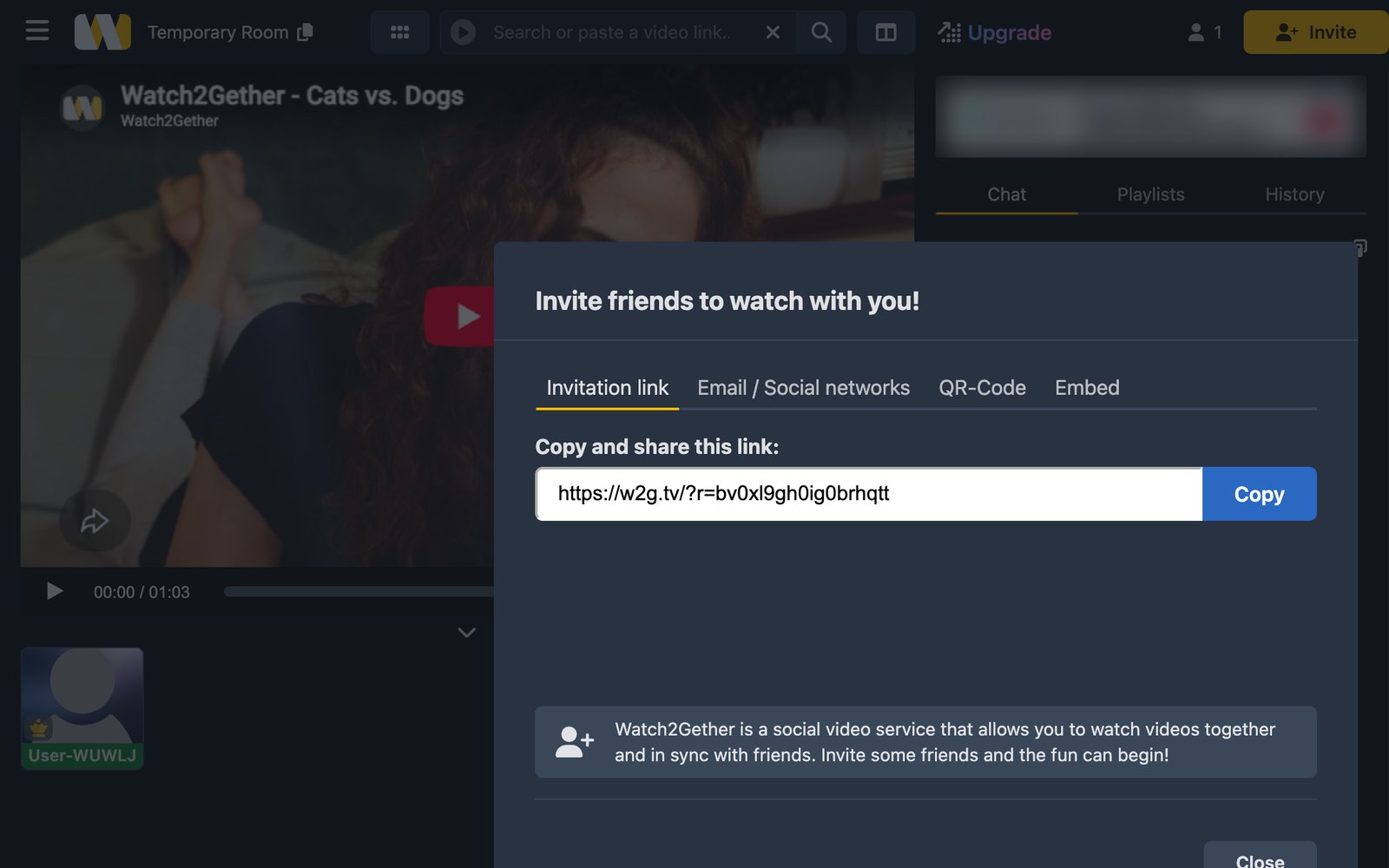
Watch2Gether is the simplest. Click “Create your room”, and you’re in a room with a player, a chat and a list of people, no account needed. Paste a YouTube link into the search bar at the top, pick the video, and send your friends the link.
One thing tripped us up: send the link from the Invite button, not from your address bar. When we pasted the address bar link into a second browser, Watch2Gether said “Invalid access code.”
Watch2Gether is free with banner ads. The paid plans remove its banners, but its upgrade page warns that “media content platforms integrated into Watch2Gether may still run ads within their media players,” so YouTube ads can still play. Guest rooms are deleted after 24 hours, so make an account if you want to keep a room.
Glint
Glint is the one I make, so weigh this accordingly. Instead of a page with a player, you get a room you decorate with illustrated stickers, and the video is one of the things in it. Add a video from Board in the dock, paste a YouTube link, and play, pause and skipping stay in sync for everyone in the room. You can talk over voice or video, or type and watch your messages pop up as bubbles over your avatar.
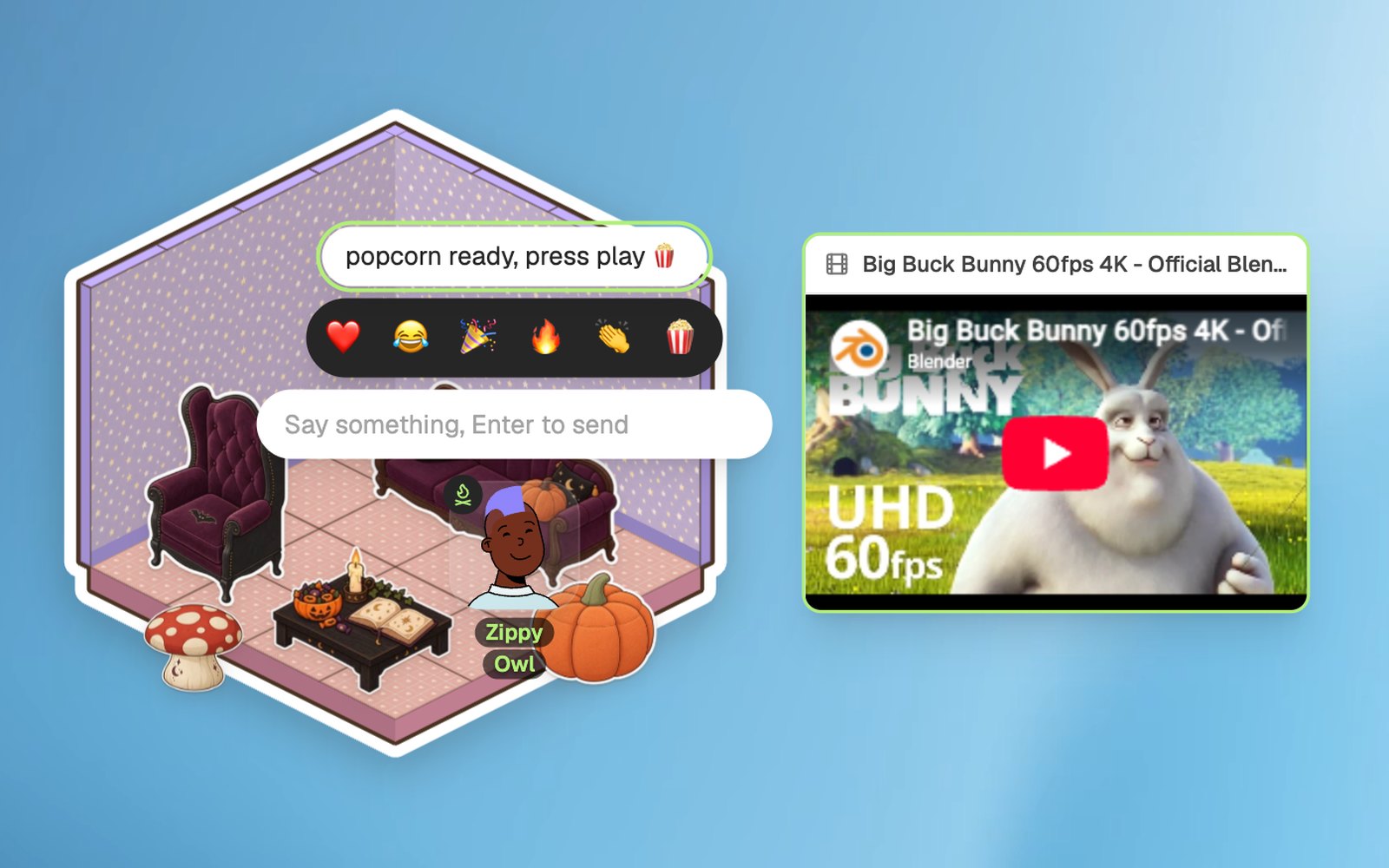
Your friends don’t need an account: they open your invite link and choose “Continue as Guest.” It’s free, and it runs in a browser on a computer or a phone. What it can’t do: Netflix or other subscription services, and YouTube videos that don’t allow embedding. More on that below. See how the watch together feature works, or try a room without signing up.
Other synced players
- OpenTogetherTube is open source and needs no account. It has a vote mode for the queue, and you can host it yourself.
- GroupTube says almost everything works without an account, and has phone apps and calls.
- Kosmi mixes watching with games and has voice and video built in. Our Kosmi alternatives guide compares it with the rest.
How do you watch YouTube together on Discord?
Start a voice call in a server, a DM or a group DM, open the Activities menu and pick Watch Together. Everyone can add videos to the queue. By default the person who started it controls play and pause, and they can switch on sharing so everyone can.
Discord’s Watch Together FAQ lists three catches worth knowing before movie night:
- Playback stops after 180 minutes when you watch as a group, or 30 minutes alone, followed by a 10 minute cool-down.
- YouTube Premium doesn’t remove ads, because the activity uses YouTube’s embedded player and can’t log in to your YouTube account.
- On a computer, you need hardware acceleration turned on in Discord’s settings.
Everyone needs a Discord account and the app on their phone, so it’s best for friends who already use Discord.
Can you watch YouTube together on FaceTime?
Yes, with SharePlay, if everyone is on an iPhone or iPad. Start a FaceTime call, open the YouTube app, play a video and confirm that you want to watch together. The person who starts it needs YouTube Premium, you need to be signed in to YouTube with a personal Google account, and the others join without Premium. On FaceTime, each person can play, pause and skip, and volume and captions stay separate.
The catch is everyone else. Friends on Android or Windows can join a FaceTime call from a browser, but SharePlay isn’t available in FaceTime on the web. YouTube’s SharePlay also doesn’t work on a Mac.
What about Google Meet?
Google Meet has YouTube co-watching on Android, started by a YouTube Premium member. It has moved around: YouTube’s old help pages for it now say the page “may be deleted because the feature doesn’t exist anymore,” and Meet’s help now lists YouTube as an add-on you open from the call’s tools. If your group lives on Android and Meet, check that the YouTube add-on shows up for you before you plan a party around it.
Does screen sharing work for watching YouTube together?
It works for most things, but it looks worse and sounds worse. On Discord, free accounts stream at up to 720p and 30 frames per second, and sharing a tab’s sound only works in some apps and browsers. Zoom has an “Optimize for video” option, and its own help page warns that leaving it on distorts text and images. In Zoom you also have to tick “Share sound,” or your friends watch in silence.
Use screen sharing for things a synced player can’t play, like a video only you can open, not as your everyday way to watch together.
Can you just count down and press play at the same time?
You can, and lots of people do. It’s free and works on any device. Writing in Android Police, Irene Okpanachi remembered how she and her friends used to watch Netflix: “We’d hop on a WhatsApp voice call, log in to the same account, and try to sync our play buttons manually with a countdown.” The trouble starts with the first ad, a slow connection or a bathroom break. One of you can end up a few seconds ahead, and you hear the joke before the other person sees it.
How do you watch YouTube together on your phones?
It depends on which phones you have:
| You have | Best way |
|---|---|
| Two iPhones | SharePlay on FaceTime, if one of you has YouTube Premium. Otherwise a synced room in Safari |
| Two Android phones | A synced room in Chrome, or Discord Watch Together if you both use Discord |
| An iPhone and an Android phone | A synced room in the browser, or Discord. SharePlay won’t include the Android phone |
| A laptop and a phone | A synced room or Discord. Both work on any mix |
On a phone, keep the room open in the browser and use headphones, or the call’s sound and the video’s sound fight each other.
Why won’t a YouTube video play in a watch party?
When a video plays fine on YouTube but not in a watch party, it’s usually one of these:
- The owner turned off embedding. Synced players use YouTube’s embedded player, and creators can switch embedding off in YouTube Studio. YouTube’s player then reports error 101 or 150, which both mean the owner doesn’t allow it. Try a different upload of the same video.
- It’s age restricted. YouTube says “age-restricted videos cannot be watched on most third-party websites.” Watch it on YouTube instead.
- It’s private, deleted or blocked in one of your countries. A video blocked in one country plays for some of you and not for others.
Two more problems look like bugs but aren’t:
- You have to press play once. Browsers often hold back a video with sound until you’ve clicked on the page. Chrome’s rules usually want you to have interacted with the site first, and Safari is stricter. If the video won’t start for someone, they click play once, and after that the sync takes over. In Glint, that’s the Join Watch button on the video.
- You keep drifting out of sync. Ads can play separately for each person, so one of you sits through an ad while the others carry on. Pause until everyone is back.
Which watch-together apps have shut down or changed?
Some older lists still recommend these:
- Amazon Prime Video Watch Party ended in 2024.
- Disney+ GroupWatch ended in September 2023.
- Rave was removed from Apple’s App Store, as its own site says. It’s still available on Android.
- Sync Video now sends you to a card games site, YouTube Sync and Gaze didn’t load when we checked in October 2026, and Kast’s site only says it’s joining another company.
Does watching together actually bring people closer?
Researchers at Dartmouth recorded people’s faces while they watched TV episodes side by side. In their 2023 study, the more in step two viewers’ expressions were, the more connected they said they felt: “the degree of synchronization predicted the self-reported social connection ratings between viewing partners.” The study was done in person, so it doesn’t prove a watch party online works the same way. Still, it suggests that reacting to the same moment at the same time is part of what makes watching together feel like being together, which is a good reason to get the sync right.
If you want more than videos, our online games for couples work over the same kind of link, and there are more ideas in our long distance date ideas.
Frequently asked questions
Can two people watch YouTube together online for free? Yes. Watch2Gether, Glint, OpenTogetherTube and Discord Watch Together are all free. SharePlay on FaceTime and Google Meet’s YouTube add-on need YouTube Premium, but only for the person who starts it.
Does everyone need a YouTube account? No. Synced rooms play videos through YouTube’s embedded player, which works without a YouTube account. Expect ads unless you have YouTube Premium and are signed in to YouTube in the same browser.
How many people can watch together? Watch2Gether doesn’t limit how many people can join a room. FaceTime calls hold up to 32 people. Discord Watch Together runs inside a voice call or channel. For two to ten friends, any of these work.
Can I watch Netflix together the same way? Not with YouTube’s tools. Teleparty syncs Netflix and other services through a browser extension or its app, and everyone needs access to the service on their own device.
Why does YouTube Premium not remove ads in a watch party? In an embedded player, YouTube only knows you’re a Premium member if you’re signed in to YouTube in that browser and its cookies aren’t blocked. Discord’s Watch Together can’t sign in to YouTube at all, so Discord says you’ll see ads there even with Premium.
Written by
Mario Jankovic
Mario makes Glint, a cozy browser app where friends build rooms together and hang out in them. He writes here about spending time with people you love online, and about everything new in Glint.
Follow Mario on Bluesky →Keep reading
Rec Room Alternatives in 2026: Where to Hang Out After Rec Room Shut Down
Rec Room shut down on June 1, 2026. The best Rec Room alternatives for hanging out with friends: VRChat, Roblox, Act Two, Gorilla Tag and Glint, and what each one is good for.

15 Virtual Halloween Party Ideas for Friends Who Live Far Away
Virtual Halloween party ideas that feel like a real night together: synced horror movies, spooky games, a costume reveal, a haunted room to decorate and more. Most are free.
Free Gather Alternatives in 2026 (Gather Is No Longer Free)
Gather ended its free plan on September 15, 2025. The best free Gather alternatives in 2026 for classes, communities and friends: WorkAdventure, Topia, ZEP, SpatialChat, Kosmi, Glint and more.
Want a room of your own?
Glint is free and runs in your browser. Make a room, decorate it with stickers and invite your friends.